Welcome

Showing posts with label Free apps. Show all posts

Blogger Mobile

Never miss out your thoughts! write it right away the first time it came out of your mind.
 download Blogger Mobile for Android on Google play store and Apple store. 


Karaoke-like for Android


Most people often sing along with the music playing in their Mp3 players as if they are in front of a Karaoke machine specially when their favorite song is playing. am I right?  well I do too.  We can all agree we've search the web for "Karaoke for Android or iPhone" an app that will let you practice and memorize lyrics before rockin with your friends in a karaoke bar.
Well then let me share this app that will make you stick more on your smartphone singing!


Download MusiXmatch on Google play - Free app 

Also available on Apple Store and Windows app store


Note: Internet is required ONLY for the application to download the lyrics for every song saved on your phone.
It only take less than a minute to download the lyrics per song once downloaded your may turn off  mobile data.


You can even  buy a microphone and plug it in on your device to enjoy more. 
This might be one of the news that I bet everyone have been waiting or asking for.
Yes it's not a hoax! Globe and Facebook are extending "FREE FACEBOOK"  service in the Philippines. 

This service started back in October 2013 to January but was extended to March and now they are extending it further until April 25, 2014
this should put a smile to everyone's face particularly  who doesn't have data plans. 
 ----------------------------------
However did you know that most of the credits for this awesome service should go to Mark Zuckerberg? the founder and CEO of Facebook. According to his keynote on World Mobile Congress in Barcelona last February 2014, he pointed out that with the help of different partners at internet.org and around the world, he is looking to provide affordable or maybe free internet service in areas where most people have no access to it.

He used Philippines as an example with this vision. he stated that in 2013 he made a partnership with Globe Telecom to start free Facebook  service.  he confirmed that this service doubled the number of people using Facebook data and Globe subscribers have grown for about 20 percent. 

Anyhow! that was just an FYI . ha ha you may go now and do some more Selfie and get more likes! 


Thanks ! 


 How to remote Android on Windows PC


On  recent post I taught you guys how to remote your desktop from your Android devices, today we will do the other way around.  We will share your Android screen to your computer.


Getting started


Considering you already have Teamviewer installed on your desktop and on your phone.
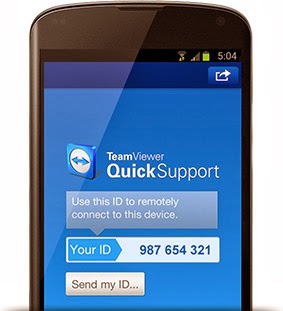
go ahead and go to Google play store and search for Teamviewer Quick support then install it.
once installed, open the app and it should look like the image at the right..


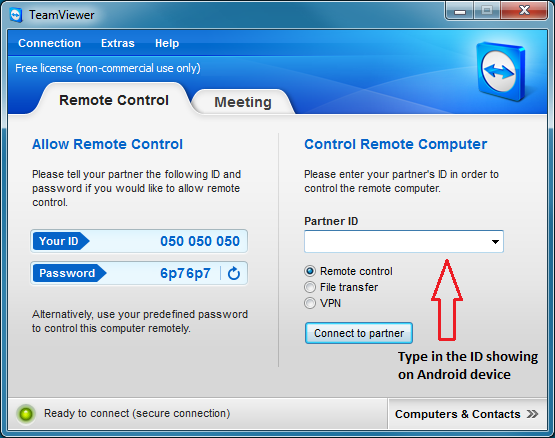
Open Teamviewer from your desktop.  

Get the "ID" appearing on your Android tablet or phone. Enter that ID to the Teamviwer app on your desktop. A confirmation request will pop-up on your phone just simply tap 'Allow'. and you should be good to go!


Teamviewer has a lot of application, you can offer support to anyone; your friends, boy friend, girl friend, family, anyone!  impress them with your techie move!! This is also good for Web Conferencing (for non-commercial use)  have fun!


Remote Windows PC for Android


Many people ask if they can access their computer remotely.   well you can.  Thanks to the best and user friendly remote desktop app available .

TeamViewer is a  free app (for personal use)  helps users access their desktop from almost any Android devices anywhere over the internet.

This app is available for Windows, Mac ,Linux, Ubuntu.... this app is best if you want to help your family or friends who are having trouble with their computers. this is also good for Video conferencing (non-commercial use)

iPhone users can also use this app. just download it from Apple store.


Lets do it!


To start, download the app for your PC,  go to www.teamviewer.com
- Click download for personal use.  the file is just roughly 1KB

 Then from your Android phone or tablet  download the Android App in Google Play
- Search <Teamviewer Remote>

After the installation of Teamviewer on your PC create an account.
once created it will register  your PC .


Now lets access your PC remotely.


From your android launch the Teamviewer app you just installed.
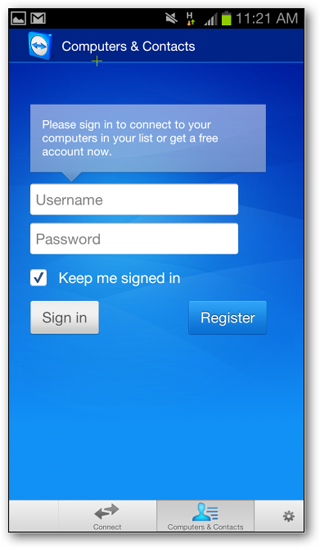
Tap on <Computers> then log in using the account you created on your desktop.
after logging in you should be able to see your registered PC name.
(note: you must be connected to the internet)
just tap the name of your PC to start viewing your desktop screen.
you can navigate / use any app installed to your desktop from your tablet or phone.


Enjoy.


How to install Adobe Flash Player on Android Phones or Tablets.


Since flash player is not available on Google play you must grant permission to install third party apps (apps downloaded outside Google store).

Go to →Settings
Security → check "unknown sources".

Choose what's compatible for you.


Click here - For Android Ginger Bread or Ice Cream Sandwich
-------------------------------------------------------------------


Links updated March 15,2014 
Source: Adobe


Disclaimer: although these files are tested clean and working install flash player at your own risk.
Tested on: Galaxy SIII I9300, Galaxy Tab 2, Galaxy S Duos and Galaxy Note 3.

(Source: Adobe)


File manager for Android

I've heard from a friend that most of Sony Xperia smartphone owners are having issues transferring their files from Internal storage to External SD card. This friend of  mine have Xperia SP, he asked me if I have an idea how to do it.

Well I'm glad I was able to help him.
First thing you need to download and app for transferring files. Xperia's native app can't do it. 
So go to Google play store and search for  "X-Plore"  by  Lonely cat game. Then after installation.
Open the app.

- your folders will show. Press on 'internal storage'
- check the files you want to move.
- long press the files with 'checks'
- check delete original files.
- Change the folder location to ' External SD card ' before      pressing 'MOVE'.


Hope that helps!


Video Player for Android

Many people asked how to play .mkv , .acc , .vlc .3gp file etc... on their Android devices.  
And I admit I was once too.

File extensions
MX Player


Which Player to get?

There are a lot of video player you can download but not most file extensions are supported.
But worry no more here's the one of best video player available out there. "MX Player".
This video player offers a variety of file extension it can read .  (samples are in the picture above)


Installation

To install go to Google play store search for MX player. After downloading the main app.
Open it and go to settings > press codecs >  scroll at the very bottom of the page.

Check for Codec you need (varies on you phone) to fully enjoy it. 
Then go back to play store and search for MX player code (ex. NeonArm 7)
Install the correct codec..
And start enjoying your videos or movies.

Comment